We’re thrilled to share several cutting-edge AI-powered features in Zoho Flow that will revolutionise how you create, improve, and manage your workflows.
These features have been in the works for some time; rather than merely implementing AI, we focused on providing useful intelligence that makes your processes more efficient and easier to build.
Zoho Flow is now more than just a platform for connecting your apps, thanks to this launch. It becomes an intelligent integration partner that can make decisions, understand context, and help you add intelligent steps to your processes that would otherwise require human involvement.
What has Zoho Flow added?
Developing processes using simple English
Building a process with drag and drop was simple, but we made it even simpler. Now, when you build a new flow, you can use natural language to explain your processes, and Zia, Zoho’s built-in AI, will turn your prompt into a real flow template with actions and app triggers.
This facilitates a speedy start for both technical and non-technical users. Every step doesn’t need to be added by hand from the beginning. Rather, you receive a solid foundation that you can further modify to meet your unique requirements.
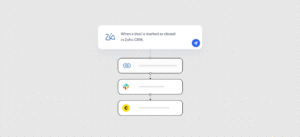
Here are some simple methods to explain your automation concepts:
“Send a thank-you email and add the contact to Zoho CRM whenever a new form is submitted on Paperform.”
“Send a reminder email and alert the finance team on Slack if an invoice in Zoho Books is past due.”
Intelligent AI tools integrated into your processes
With Zia Utilities, your processes can now automatically produce, clean, and optimise material as it enters and exits your apps.
Now that the workflow builder has Zia Utilities integrated, you can:
- Create context-based email responses.
- Label email content with terms like “invoice”, “query”, or “complaint”.
- Using the basic specifications, create product descriptions.
- Create checklists from free-text instructions.
- Recognise tone and condense lengthy discussions
- Reword information to improve tone or clarity.
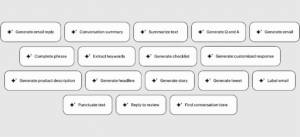
Consider use cases like:
Use the discussion summary to make a preliminary answer when a ticket is created in Zoho Desk.
Get deal insights by extracting keywords from sales representatives’ notes and sending them to Zoho Analytics.
Before sending, reword support communications from “technical” to “customer-friendly”.
Real-time thinking and doing agentic activities
Allow Zia to take the next action based on prompts and real-time context by incorporating agentic actions into your workflows.
All you need to do is set up a series of intelligent actions for Zia to select from and include a clear prompt in the agentic action of your flow regarding the specific manner in which you would like the data to travel between the apps. Without your manual intervention, Zia assesses the scenario and inputs throughout execution before intelligently choosing and carrying out the most pertinent actions.
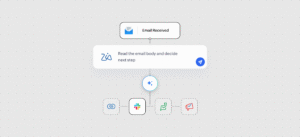
Agentic activities can be used in situations such as:
Depending on how you prompted it, Zia can choose an action from a list if a new Zoho CRM lead has a deal size greater than $5,000 and the notes indicate that it is “Urgent”:
Put a high-priority tag there.
Give it to a senior representative.
Use Slack to Inform Presales
Depending on the context and attitude of the support ticket, the agent may choose to close it, escalate it, or ask for more information.
These additional features weren’t included merely to fulfil a need. They are made to help you begin automation more quickly and smoothly, manage information and communication within workflows, and allow intelligent agents to make context-based decisions.
These elements serve as the foundation for building automations at scale using AI and increasing productivity with less manual labour, from developing your first flow to growing intricate automations.
Turn on AI in Flow and use these features.